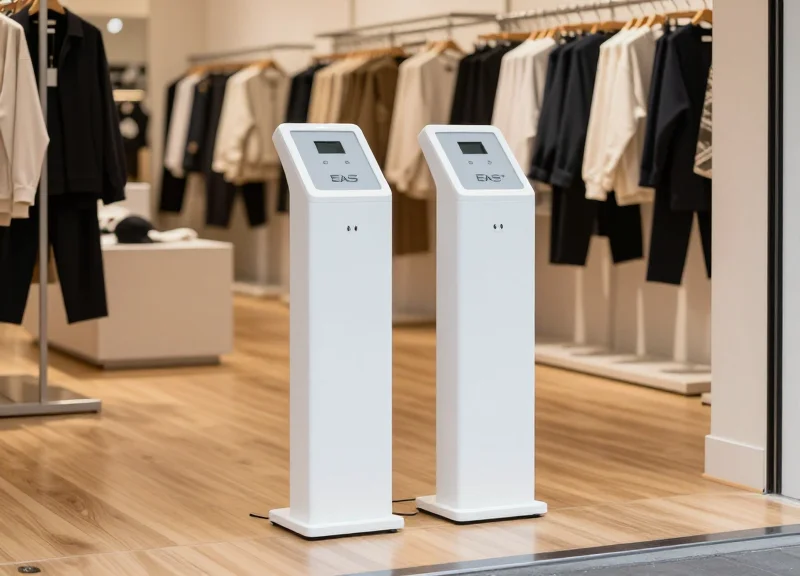
For years, installing Electronic Article Surveillance (EAS) systems was a major logistical headache involving heavy machinery, floor drilling, and costly professional contractors. In today's fast-paced retail environment, store managers need agility without sacrificing security. This guide reveals how modern plug-and-play EAS technology has revolutionized loss prevention, allowing you to deploy a high-performance security perimeter in under 20 minutes with zero damage to your flooring. Whether you are a pop-up shop or a permanent boutique, eliminating setup friction starts here.
The Evolution of EAS: Moving Beyond Permanent Installations
The evolution of Electronic Article Surveillance (EAS) represents a fundamental pivot from 'static infrastructure' to 'agile security.' Traditionally, EAS installation was a destructive process involving concrete drills, under-floor cabling, and specialized contractors. Today, the industry has moved toward plug-and-play pedestals that utilize advanced Digital Signal Processing (DSP) and self-tuning electronics, allowing retailers to deploy enterprise-grade loss prevention in under 20 minutes without damaging the property or requiring a building permit.
| Feature | Legacy Hard-Wired Systems | Modern Plug-and-Play Systems |
|---|---|---|
| Installation Method | Floor drilling and anchoring | High-stability baseplates/adhesives |
| Power Requirements | Dedicated hard-wired circuits | Standard AC outlet (110v/220v) |
| Deployment Time | 4 - 8 hours per entrance | 15 - 20 minutes |
| Technical Expertise | Specialized technician required | Store staff / DIY |
| Portability | Permanent (destructive removal) | 100% Mobile (re-deployable) |
Why are retailers moving away from permanent installations?
Shorter lease cycles and the rise of pop-up retail demand flexibility. Permanent installations are seen as liabilities that complicate store turnover and increase decommissioning costs.
Does 'no-drill' mean less security?
Not at all. The security efficacy comes from the RF or AM frequency detection logic, not the bolts. Modern systems use weighted, anti-tip bases that offer the same physical presence as bolted units.
What technological breakthrough enabled this shift?
The miniaturization of power supplies and the development of auto-tuning controllers allowed the 'brains' of the system to be housed entirely within the pedestal, eliminating the need for external control boxes.
The 'Silicon Valley' perspective on this is clear: hardware is becoming 'soft.' In the same way we moved from on-premise servers to cloud instances, retail security is moving from fixed assets to flexible tools. Expert Tip: Retailers should consider the 'Lease Restoration Trap.' Drilling four 1/2-inch anchor bolts into a polished concrete or marble floor can result in $2,000 to $5,000 in floor restoration fees when a lease ends. A plug-and-play system isn't just about saving time today; it’s a strategic move to protect your security deposit and maintain the asset value of your physical space.
Anatomy of a Plug-and-Play EAS Kit
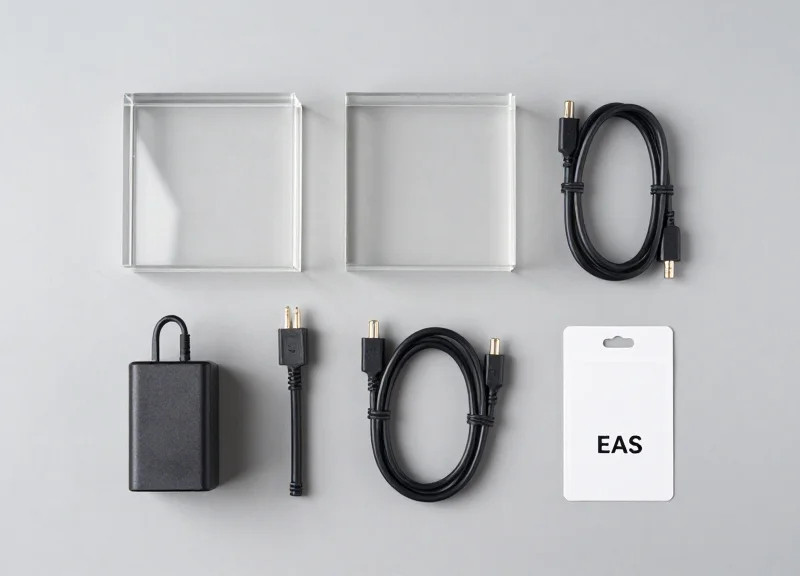
A plug-and-play (PnP) EAS kit is a pre-configured anti-theft system consisting of an active master pedestal, a passive satellite pedestal, and a dedicated power supply, all designed for tool-free assembly. Unlike traditional systems that require manual frequency tuning, these kits feature internal electronics that are factory-calibrated to detect 58kHz (AM) or 8.2MHz (RF) tags immediately upon power-up, eliminating the need for professional technician intervention.
| Component | Function | PnP Advantage |
|---|---|---|
| Master Pedestal | Contains the main controller and signal transmitter. | Houses 'Auto-Tuning' logic to adapt to store noise. |
| Satellite Pedestal | Acts as a receiver to widen the detection corridor. | Pre-wired with quick-connect aviation plugs. |
| Power Adapter | Converts AC outlet power to low-voltage DC. | Standard 3-prong plug; no hard-wiring into the breaker. |
| Integrated Baseplate | Provides stability and hides cabling. | Heavy-duty weighted or adhesive design; no drilling. |
- Tuning-Free Internal DSP: The Digital Signal Processor (DSP) is the brain of the kit. In PnP models, this chip uses adaptive algorithms to filter out 'environmental noise' like LED lighting or nearby electronics, which previously required an oscilloscope to calibrate.
- Plug-and-Socket Cabling: Instead of bare wires and terminal blocks, PnP kits use keyed connectors (often M12 or GX16) that only fit one way, preventing polarity errors during setup.
- Non-Invasive Mounting Hardware: Modern kits ship with industrial-grade 3M VHB adhesive pads or weighted floor plates, allowing the pedestals to meet safety tip-over standards without puncturing the subfloor.
Expert Insight: The 'Zero-Drift' Oscillator. A common failure point in legacy EAS is frequency drift, where the system slowly loses sensitivity over time. Premium plug-and-play kits utilize temperature-compensated crystal oscillators (TCXOs). This ensures that even if your store's entrance gets hit by a blast of winter air or summer heat, the detection field remains rock-solid without needing a technician to 'tighten' the signal.
Phase 1: Selecting the Optimal Entry Point Location

The optimal entry point location for a plug-and-play EAS pedestal is a flat, vibration-free surface within six feet of a dedicated power outlet, positioned at least 10 inches away from large, moving metal objects like automatic sliding doors. To eliminate the need for drilling, the site must accommodate a weighted baseplate or high-bond adhesive strips while maintaining a clear 'detection corridor' that aligns with your store's natural traffic flow.
When installing without permanent floor anchors, your biggest adversary is 'Environmental Noise.' Unlike bolted systems that can be tuned to compensate for static interference, plug-and-play units rely on clean environments to maximize their internal auto-tuning algorithms. You must identify a location that avoids 'Metal Loops'—areas where metal door frames, floor-to-ceiling windows, and security gates create a circuit that traps the system’s RF or AM signals, leading to phantom alarms or reduced sensitivity.
| Tag Type | Max Detection Width (Dual System) | Max Detection Width (Single Pedestal) |
|---|---|---|
| DR Soft Labels | 1.2 Meters / 3.9 Feet | 0.6 Meters / 2.0 Feet |
| Mini Hard Tags | 1.5 Meters / 4.9 Feet | 0.75 Meters / 2.5 Feet |
| Large Alpha/Pencil Tags | 1.8 Meters / 5.9 Feet | 0.9 Meters / 3.0 Feet |
Expert Tip: The 'Ferrous Shadow' Check. Before finalizing your spot, use a handheld magnet or a basic compass near the floor. If the needle deflects wildly, you are sitting directly over heavy steel rebar. In a no-drill setup, this rebar can 'shadow' your signal. Moving the pedestal just 4 inches to the left or right can often increase your detection rate by up to 15% without changing any settings.
How far should the pedestal be from the checkout counter?
Maintain a minimum distance of 3 to 4 feet. Point-of-Sale (POS) systems, credit card terminals, and computers emit electromagnetic noise that can desensitize the EAS receiver.
Can I install the pedestal directly against a metal door frame?
No. You should maintain at least a 10-inch gap. If the door frame is aluminum, the interference is lower, but steel frames can 'steal' the signal, significantly shrinking your detection corridor.
Is a standard 110V/220V outlet sufficient?
Yes, but it should ideally be a 'clean' line. Avoid plugging the pedestal into the same power strip as high-draw appliances like space heaters or large beverage coolers, which cause power surges.
- Map the Power: Locate the nearest outlet and ensure the power cable can be routed safely using a low-profile floor cord cover to avoid trip hazards.
- Measure the Aperture: Measure the width of your entrance. Ensure the distance between pedestals does not exceed the maximum detection width of your smallest tags (refer to the table above).
- The Door Swing Test: Open your doors to their maximum extent. Ensure the door handle or the metal frame does not come within 8 inches of the pedestal at any point during its arc.
- Mark the Baseplate Perimeter: Use painter's tape to mark the floor. This allows you to visualize the customer flow and ensure the pedestal doesn't create a bottleneck before you apply adhesives.
Phase 2: The No-Drill Mounting Secret
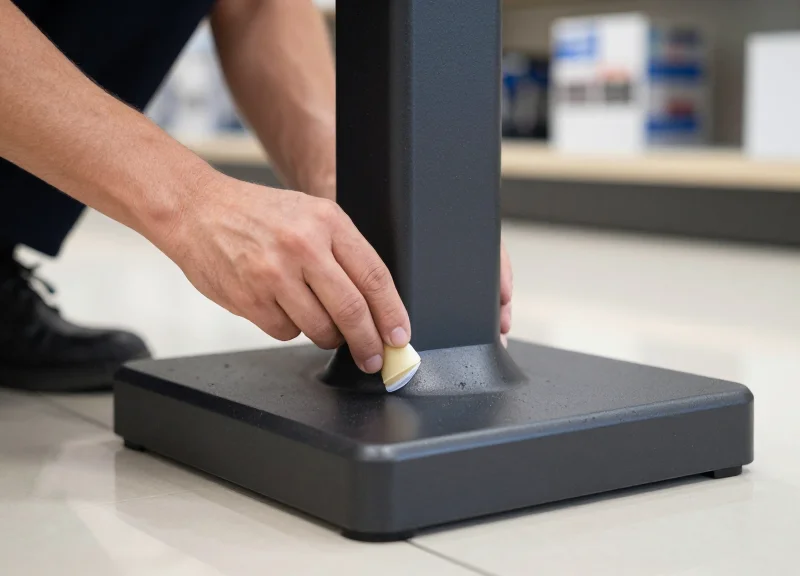
The 'No-Drill' mounting secret lies in the synergy between high-mass floor plates and industrial-grade structural adhesives, specifically modified silane polymers or 3M™ VHB™ technology. This method creates a high-shear-strength bond that anchors the EAS pedestal to premium surfaces like marble, polished concrete, or hardwood without the need for destructive masonry bits or floor anchors, ensuring a zero-footprint installation that is as stable as a bolted system.
| Feature | Traditional Bolting | Industrial Adhesive Mounting |
|---|---|---|
| Installation Time | 45-60 Minutes | 10-15 Minutes |
| Floor Damage | Permanent Holes | Zero Damage (Removable) |
| Tool Requirements | Hammer Drill, Masonry Bits | Cleaning Solvent, Adhesive Kit |
| Stability Grade | High Mechanical | High Shear/Tension |
| Surface Compatibility | Concrete/Wood Only | Marble, Tile, Glass, Wood |
- Surface De-energizing: Clean the target area with a 70% Isopropyl Alcohol solution. Removing microscopic oils and dust is critical for the adhesive to achieve 100% surface contact.
- Base Plate Priming: Apply a thin layer of adhesion promoter to the underside of the EAS pedestal base plate. This chemically preps the metal to bond with the polymer.
- Adhesive Mapping: Apply the high-strength adhesive tape or liquid polymer in a 'perimeter and cross' pattern. This prevents air pockets and ensures even distribution of weight.
- The 60-Second Set: Position the pedestal and apply downward pressure (approximately 15kg) for 60 seconds. This initiates the 'wetting' process where the adhesive flows into the floor's micro-textures.
Expert Tip: The Thermal Activation Hack. In environments below 20°C (68°F), industrial adhesives can take longer to reach maximum tack. Use a standard hair dryer to gently warm the floor surface and the base plate for 30 seconds before application. This 'thermal jumpstart' increases the initial bond strength by up to 40%, allowing for immediate cable connection and system testing without waiting for a 24-hour cure cycle.
Will the pedestal tip over if a customer bumps it?
No. Industrial structural adhesives are designed for high shear strength. While they can be removed with specific lateral force and heat, they easily withstand the typical 10-20 lbs of lateral pressure from accidental bumps.
How do I remove it when my lease is up?
Removal requires a heat gun and a high-tensile wire saw or a flat pry tool. Once the bond is broken, remaining residue is safely cleared with an adhesive remover, leaving the floor in its original condition.
Is it safe for antique hardwood floors?
Yes, provided the finish is intact. The adhesive bonds to the sealant/varnish, not the raw wood, preventing staining or fiber tearing during removal.
Phase 3: Connecting and Powering Up the System
Connecting plug-and-play EAS pedestals involves linking the master unit to the slave unit via a pre-terminated synchronization cable and plugging the primary power supply into a standard 110V/220V wall outlet. Unlike traditional systems that require dedicated electrical circuits and hard-wiring, modern no-drill solutions use low-voltage DC transformers, making the installation as simple as setting up a home computer.
- Lay the Interconnect Cable: Route the provided cable through the hidden channel in your no-drill floor plate. This cable transmits both power and synchronization signals between the pedestals.
- Secure the Internal Ports: Open the base covers and plug the pre-terminated connectors into the clearly marked 'Master' and 'Slave' ports on the internal control boards.
- Final Power Connection: Connect the AC power adapter to the master pedestal and plug it into a standard, surge-protected wall outlet.
- Initial Self-Test: Observe the onboard diagnostic LEDs. A steady green light typically indicates the system has successfully completed its boot sequence and is ready for calibration.
| Feature | Plug-and-Play Specification | Traditional EAS Requirement |
|---|---|---|
| Power Source | Standard AC Wall Outlet | Dedicated Hard-wired Circuit |
| Voltage | 24V DC (Low Voltage) | 110V/220V AC (High Voltage) |
| Cabling | Pre-terminated 'Plug' Connectors | Manual Wire Stripping/Terminal Blocks |
| Specialist Needed | None (DIY Friendly) | Licensed Electrician |
Expert Insight: The 'Clean Power' Rule. While plug-and-play systems are resilient, they are sensitive to 'electronic noise' on the power line. To eliminate 90% of false alarms before they happen, ensure your EAS pedestal is not sharing an outlet or a direct daisy-chain with high-draw motors, such as commercial refrigerators or HVAC units. If you must share a circuit, use a simple ferrite bead clip on the power cable to filter out interference.
Can I use an extension cord if the outlet is too far?
Yes, but use a high-quality, grounded extension cord and ensure it is secured with a cable cover to prevent tripping hazards and signal degradation.
What should I do with excess interconnect cable?
Never coil excess cable into tight circles, as this can create an induction loop that interferes with detection. Instead, fold the cable in a 'figure-eight' pattern and secure it with zip ties.
Does the system need to stay on 24/7?
Yes. Most EAS systems consume less than 25W of power (similar to a LED bulb), and keeping them powered prevents internal condensation and ensures the system is always ready for store opening.
Automated Tuning: Letting the Software Do the Work

Automated tuning is an intelligent self-calibration feature in modern Plug-and-Play EAS systems that uses Digital Signal Processing (DSP) to scan the surrounding environment, identify electromagnetic interference, and adjust detection sensitivity without human intervention. Unlike traditional systems that require an oscilloscope and a specialized technician, these software-driven pedestals perform a dynamic noise-floor analysis during the first 60 seconds of power-up to ensure peak detection accuracy right out of the box.
| Feature | Traditional Manual Tuning | Modern Automated Tuning |
|---|---|---|
| Required Tools | Oscilloscope & Multimeter | None (Self-Configuring) |
| Setup Time | 2-4 Hours | < 2 Minutes |
| Technician Cost | $150 - $500 per visit | $0 (Included in Software) |
| Adaptability | Static (Needs manual re-tuning) | Dynamic (Real-time adjustments) |
- Initial Environment Scan: Upon powering on, the system immediately measures ambient RF noise levels from nearby electronics and infrastructure.
- Noise Floor Mapping: The DSP creates a digital fingerprint of 'safe' background noise, such as interference from LED signage or nearby mall security systems.
- Sensitivity Optimization: The software adjusts gain levels to maximize the detection of security tags while suppressing the signals that cause false alarms.
- Synchronized Pulse Check: If multiple pedestals are used, the software automatically synchronizes their firing sequences to prevent signal cross-talk.
Expert Insight: The hidden advantage of software-driven tuning is 'Adaptive Thresholding.' In most retail environments, the electromagnetic noise floor is not static—it shifts as neighboring stores turn on high-powered lighting or refrigeration units. While a manually tuned system will begin 'phantom alarming' when these external factors change, an automated system performs sub-millisecond adjustments to its internal logic, effectively creating a self-healing security perimeter that evolves with your store's daily cycle.
Do I need to recalibrate if I move the pedestal?
No. Simply power-cycle the unit in its new location. The software will automatically re-scan the environment and optimize settings for the new placement in seconds.
How do I know if the auto-tuning was successful?
Most systems use a simple LED status light or a 'ready' beep sequence to confirm that the environment scan is complete and the system is armed.
Can the software handle heavy metal interference?
Modern algorithms include 'Metal Compensation' which identifies static metal objects (like door frames) and filters their signal reflection out of the detection loop.
The 5-Minute Testing Protocol
The 5-Minute Testing Protocol is a rigorous validation sequence designed to map your EAS system's 'detection envelope' immediately following a no-drill installation. This process verifies that the pedestals are successfully communicating and that environmental factors—like nearby metal frames or LED lighting—are not creating 'dead zones.' By systematically testing hard tags and soft labels at varying heights and orientations, you ensure that the system provides a 360-degree security barrier without the need for professional diagnostic equipment.
- The Hard Tag Perimeter Sweep: Hold a high-quality hard tag at waist height and walk through the center of the pedestals at a normal pace. Repeat this at the far left and far right edges (near the pedestals themselves) to ensure the signal is consistent across the entire width of the entrance.
- The Soft Label 'Flat-Surface' Test: Soft labels have a smaller surface area and are more sensitive to orientation. Pass a deactivated and then an active soft label through the system. Ensure you test with the label facing parallel and perpendicular to the pedestals to confirm detection regardless of how the customer holds the item.
- The Knee-Level and Shoulder-Level Check: Detection strength can dip at extreme heights. Sweep your test tag near the floor (to simulate items in shopping bags) and at shoulder height (to simulate handheld items) to verify the vertical detection field is fully intact.
- The 360-Degree Rotation: Stand in the center of the pedestals and slowly rotate the tag in a full circle. This ensures that the internal antennas are 'picking up' the tag's resonance from every possible angle, leaving no orientation-based vulnerabilities.
| Tag Type | Typical Detection Range | Pass/Fail Benchmark | Common Interference |
|---|---|---|---|
| Hard Tags (e.g., Pencil/Golf) | 1.2m - 1.8m | 98-100% Accuracy | Large Metal Cartons |
| Soft Labels (e.g., 4x4 DR) | 1.0m - 1.4m | 85-95% Accuracy | Aluminum Foil/Liquid Content |
Expert Silicon Valley Tip: The 'Dynamic Baseline' Strategy. Most installers test in a quiet store. For a truly 'bulletproof' setup, perform your final test during peak hours when your automatic doors are cycling and your overhead LED displays are fully powered. This identifies 'Intermittent Interference'—ghost signals caused by electromagnetic noise from other retail technology that might cause false alarms or reduced sensitivity only when the store is busy.
What should I do if the system alarms without a tag present?
This is likely 'phantom alarming' caused by electrical interference. Check if the power cable is crossed with other high-voltage lines, or move any large metal displays at least 3 feet away from the pedestals.
Why does the tag only detect when it's close to one pedestal?
This usually indicates a synchronization issue between the Master and Slave pedestals. Ensure the interconnect cable is fully seated and that the auto-tuning software has completed its cycle.
Can I test using a tag inside a shopping bag?
Yes, in fact, we recommend it. Testing with 'real-world' variables like bags or layered clothing provides a more accurate assessment of how the system will perform in actual loss prevention scenarios.
Troubleshooting Common Signal Interference

Signal interference in plug-and-play EAS pedestals occurs when ambient electromagnetic noise or nearby conductive materials disrupt the system's detection field, leading to 'phantom alarms' (alarming without a tag) or 'dead zones' (failing to detect a tag). Most interference is caused by high-frequency electronic devices, improperly shielded power cables, or large metal loops within three feet of the antennas. Resolving these issues typically requires minor physical repositioning or identifying the specific 'noise-maker' in your retail environment.
| Symptom | Probable Cause | 2-Minute Fix |
|---|---|---|
| Random Phantom Alarms | Neon signs or LED driver interference | Toggle lights off to test; move pedestal 12 inches away if noise stops. |
| Weak Detection/Dead Zones | Nearby metal door frames or floor rebar | Increase 'No-Drill' base offset from metal frames by 4-6 inches. |
| Constant Beeping | Electronic tags left too close to the system | Clear a 5-foot 'Clean Zone' around pedestals of all tagged merchandise. |
Why does my system alarm only at certain times of the day?
This is usually linked to external environmental factors such as neighboring store security systems or automatic sliding doors being activated during peak hours. If your pedestal features automated tuning, power-cycle the unit during these busy times to allow the software to recalibrate against the increased noise floor.
Can my point-of-sale (POS) terminal interfere with the signal?
Yes, specifically the power bricks and monitor cables. Ensure all POS cabling is bundled tightly and kept at least 3 feet away from the master pedestal antenna to prevent RFI (Radio Frequency Interference) leakage from entering the receiver.
What should I do if the alarm goes off when there is no one at the door?
Check for 'hidden' metal loops, such as chrome display racks or holiday decorations with metallic tinsel nearby. These can resonate at the same frequency as your tags, creating a feedback loop that triggers the system.
Expert Tip: The LED Driver Ghost. In the modern retail landscape, the most common 'invisible' culprit for EAS interference isn't the power grid—it's cheap LED ceiling panels. Many low-cost LED drivers emit massive amounts of RFI that mimic the pulse of an EAS tag. If you experience persistent phantom alarms, use a simple AM radio tuned to the lowest frequency; if you hear loud buzzing near your lights, you’ve found your source. Switching to shielded LED drivers or moving your no-drill pedestal just a few inches can often solve a problem that would baffle a traditional technician.
Cost Analysis: DIY vs. Professional Installation Services
The true cost of EAS installation extends far beyond the price of the hardware; it encompasses technician labor rates, travel surcharges, and the high opportunity cost of closing your retail floor during drilling and wiring. While professional installation for legacy systems can cost between $400 and $1,200 per pedestal depending on complexity, a DIY plug-and-play setup reduces your installation expenditure to nearly zero, requiring only 20 minutes of internal staff time. By bypassing the need for specialized electrical contractors and proprietary tuning equipment, retailers can achieve an immediate ROI within the first month of operation.
| Expense Category | Professional Installation | DIY Plug-and-Play | Net Savings |
|---|---|---|---|
| Base Labor (per pedestal) | $250 - $500 | $0 (Internal Staff) | $250 - $500 |
| Call-out & Travel Fees | $75 - $150 | $0 | $75 - $150 |
| Floor Drilling/Restoration | $150 - $300 | $0 (Adhesive Plate) | $150 - $300 |
| Store Downtime (4-6 hrs) | High ($500+ in sales) | Negligible (< 20 mins) | Varies |
The Veteran's Insight: The 'Software Gatekeeping' Tax. Most retailers overlook the hidden cost of legacy system maintenance: proprietary calibration tools. Traditional EAS systems require a technician to return for 'tuning' every time you move a metal display rack nearby. Modern plug-and-play systems utilize AI-driven auto-tuning that adjusts to environmental changes in real-time. This eliminates the 'Technician Tax'—a recurring $200+ service fee common with older systems—ensuring your total cost of ownership (TCO) remains significantly lower over the 5-10 year lifespan of the hardware.
Does DIY installation void the product warranty?
No. Most reputable plug-and-play EAS manufacturers specifically design their units for user-end setup. As long as the provided high-strength adhesive and power-link cables are used according to the manual, your hardware warranty remains fully intact.
Will I save more by buying used legacy equipment?
Rarely. While a used pedestal might be cheaper upfront, the costs of hiring a specialist to reconfigure, tune, and bolt it into your floor usually exceed the cost of a brand-new, modern DIY system within the first year.
How does downtime impact my ROI calculations?
Professional installs often require 'quiet hours' or floor clearing, disrupting sales. A 20-minute DIY setup can be performed between customer rushes, meaning your ROI starts accruing from the moment the box is opened without a single lost sale.